Showing posts with label dba. Show all posts

Thursday, February 27, 2014

Database UpGrade ("DBUA")

Upgrading a database is one of the reponsibilities of a database administrator (DBA). In most open source databases, it is much easier to upgrade the database whether you're a DBA, Developer or System Administrator. In Oracle, however, the process is somehow different. It is much more complex involving different steps.

In this post, we will look out the easy method of upgrading a database from one version to another higher version. I am using 11.2.0.3.0 to 11.2.0.4.0

In Oracle 11g, database upgrade can be invoked using the "DBUA" - an acronym for Oracle Database Upgrade Assistant.

Patch versus Upgrade
What is a Patch? How is this different from an upgrade?
Take note that an Oracle Patch is more of an update for newer security and performance fixes whereas upgrade is a total reconfiguring of the database or software version. You can login into Oracle Support with your userid and identifier to download an Oracle Patch.

Oracle version numbering
11.2.0.4.0 is the most current upgrade available for Oracle 11g to date. The "11" stands for the database version number, "2" is the release number, "0" is application release number, "4" is the component release number, which is the main upgrade we are interested in. The last "0" is the platform specific number. You can update this with Opatch. See Oracle documentation on this topic here: Identifying Your Oracle Database Software Release

Upgrading Database from 11.2.0.3.0 to 11.2.0.4.0

Please follow this easy steps to upgrade your database to 11.2.0.4:

1. Make sure you have installed the 11.2.0.4.0 full installation with a new ORACLE_HOME. This is a full installation
2. Take backup of database
3. Export new ORACLE_HOME and adjust /home/oracle/.bash_profile
6. Open a terminal and run "DBUA" to upgrade database

PLEASE NOTE

To upgrade a database, the database must be in "Open" mode before you start. If your database is in "mount" or "nomount" state, you will run into this error.


You have to start your database and ensure that it is open before you continue.


Launch the "DBUA" from the terminal


Choose the right database you want to upgrade. In this example, I have more than one databases with version 11.2.0.3.0. I chose the last one.


Confirm the operation. Click "Yes"


Here you can choose the "Paralellism" for the process. This implies the speed to accomplish this upgrade process.


Here is an opportunity to migrate the datafiles from their present location to a new one. DBUA can do this for you during the upgrade. Remember that almost all database settings can be adjusted during an upgrade. You can also let DBUA take a backup of the database for you before the upgrade.


Please "Browse" to select the right directory to move the datafiles to. If you do not want to move datafile to a new location, simply ignore this step.

 
 Change the size of the Fast Recovery Area (FRA). This size will control the backup repository. If you miss this setting, you will have to change the setting after the database has been upgraded by using the "Alter System Set" command.


This screen shows a summary of the Database Upgrade options selected before the process is started. You can still make adjustments by clicking the "Back" button. At this stage, you want to verify the Database name, version and ORACLE_HOME.

 
Click on "Next" and the process will start

 
Wait for the process to complete. Once the process completes 100%, you will click "Ok"

 
This is the feedback page. Here you need to verify that the upgrade has been done.
If for any reason you need to rollback the upgrade process, click on "Restore Setting Only".
If you need to change passwords, click on "Configure Database Password"
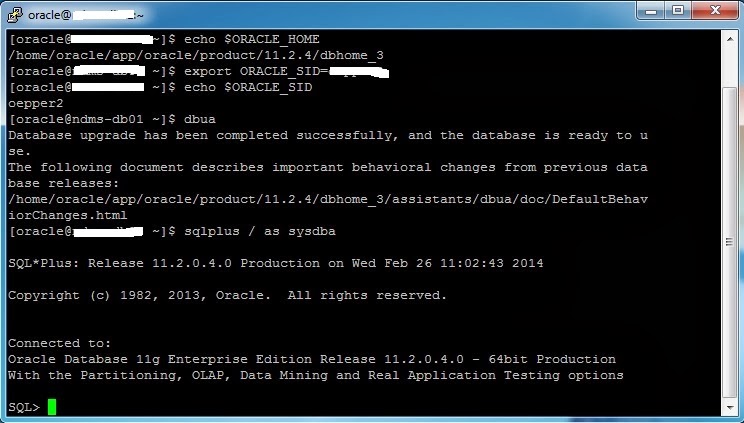

 
Here you log in to verify the version. In addition to the command shown in the image, you can also run this command:

SELECT  *  FROM PRODUCT_COMPONENT_VERSION;

PRODUCT                                                 VERSION     STATUS
-------------------------------------------------------- ----------- -----------
NLSRTL                                                       11.2.0.4.0  Production
Oracle Database 10g Enterprise Edition       11.2.0.4.0  Prod
PL/SQL                                                         11.2.0.4.0  Production

Thanks for reading!


Saturday, December 1, 2012

common Oracle DBA interview questions and answer

Here is a small list of questions and answers for junior and mid-level Oracle DBA jobs. Mastery of these questions and answers will help you survive most interview session, and also expose you to some basic and advanced tips you need on the job.

What is the relationship between Control files and V$view?
V$views are kept in the control file. This is why v$ views are always accessible even when the database is in a lesser state.

Can you access V$view while the database is not open?
Yes. V$view can be accessed even when the database is in nomount mode or in a lesser state.

How many stages are involved in getting the database open and running?
3 stages namely: Nomount, Mount and Open stage

What are the Mandatory processes in Oracle?
The processes are the backgound processes. The mandatory ones are Checkpoint, PMON, SMON, Log Writer and Database Writer.

What is an instance?
A combination of memory structure and background processes.

Where can I monitor the Retore job that my colleague did to check if it went well or done properly?
Alert log. Alert log is in background dump. From SQL prompt issue: 'show parameter background dump'

I discovered that my control files are missing, what are my option?
Create another control file from the existing one (multiplex). If there is no existing one, create/build Control file from scratch with a text file. Always back up control file to Trace so that you can have a text file to create a fresh control file.

What is RAC?
Real Application Clusters. A combination of multiple instances accessing a database. The node represents each instance in the cluster.

Why should a client use RAC?
To avoid a single port failure. When there is only one instance, reliability and fault tolerance is low.

What are the demerits of RAC?
It is expensive to maintain. It requires lot of resources (hardware and manpower) as well as maintenance costs. Most firms now use VMware to reduce hardware costs.

What is ASM?
Automatic Storage Management

What would you use ASM?
It is free and more convenient for file management. It helps with load balancing as well as improves reliability and availability.

What is the difference between full and incremental backup?
Full backup is when you backup the whole database and the database is not in open mode. Incremental backup is when you copy the changes that has occured after the last full backup. This is usually done when the database is open and running, and in ARCHIVELOG mode.

Can you use RMAN without database in archivelog mode?
Yes, you can take a cold backup when the database is cleanly shut down.

What is DATAPUMP?
It is a new features that oracle introduced to enhance import and export of database, tablespace, schema and tables. Prior to Datapump, DBAs used regular imp and exp.

What are the basic features that differentiate Datapump from Import and Export?
Datapump allows remaping of database, tablespace, schema and tables. Datapump is also very fast. You can increase parallelism by increasing the workers that will execute the job.
Please note that parallelism is only compatible with Enterprise edition of oracle 10g and 11g.

Best of luck in your interviews and shoot me an email if you have questions.
Cheers!

Saturday, June 2, 2012

Career changer


"Change is the only permanent factor"

Oracle DBA is indeed a career changer. No matter where you are currently in your profession, you can still join the league of high-earners in the Information Technology field. One of the most popular units of the IT field is Database Administration. As a DBA, you will be expected to handle resource or capacity planning, grant user access to the database, manage and repair the database, monitor connections to and secure the database, and also train users. This surely sounds easy but it involves a lot of work.

One of the questions I answer everyday is: "How can I become an Oracle DBA?"

I've answered this question more than 100 times in less than 2 months! This shows that many people are interested in becoming database administrators but do not presently have an idea how they can become one. Becoming a DBA is very simple if you follow the key steps I will provide on this blog. For simplicity of this particular post, I will outline 3 areas you can work on as a 'new-comer' in the DBA field.

1. Attend an Oracle class, or database management seminar;
2. Get obsessed with the field (talk about it);
3. Read independently and practice;
4. Build confidence through networking (with other DBAs); and
5. Get certified.


The essence of this post is not to discuss these steps because it will be exhausting. I will pick these topics one after the other and also bring in writers to contribute.

I believe this blog will help someone out there to change career or build a new career in Database administration. This blog will also serve as an avenue of exchanging ideas with my peers in the field. Just for introduction, my name is Kunle Elebute and I am an Oracle DBA with many years of experience.

Thanks for reading.


MySQL


Acknowledgement: Picture credit to Lenovo
Content: Facet Technical Institute